
Customer Edge networking features
Overview
Use this guide to understand the commonly used networking features on the F5 Distributed Cloud Customer Edge (CE).
CE site-to-site connectivity
By default, a CE Site connects to two Regional Edges (REs) on the F5 global network. The F5 global network is used as a transit method between CE sites. Direct CE site-to-site connectivity involves direct tunnels between the CE sites that don't involve the REs.
There are two types of connections:
-
Site Mesh Group (SMG): This utilizes encrypted connectivity between CE Sites and leverages Internet Protocol Security (IPsec) tunnels.
-
DC Cluster Group (DC-CG): This utilizes unencrypted connectivity between CE sites and leverages IP-in-IP tunnels.
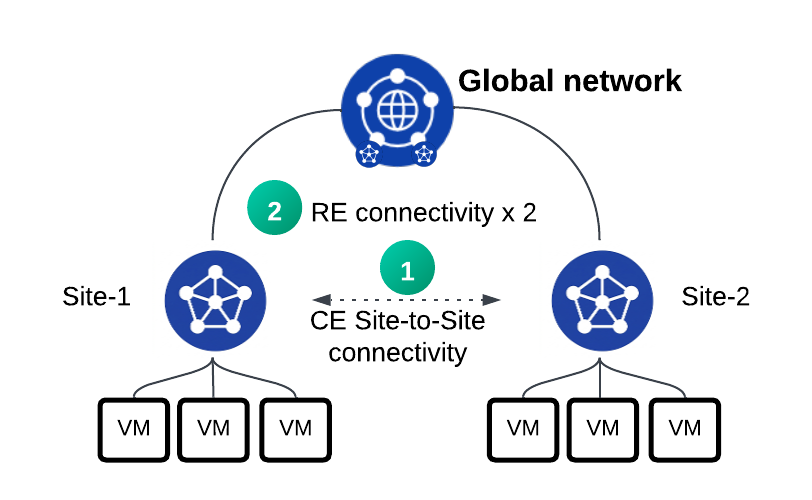
Figure: CE site-to-site connectivity diagram
Site Mesh Group
An SMG provides IPsec connectivity between CE sites and is a key pillar in fabric creation.
See the following about an SMG:
- An SMG is initiated from the SLO interface only. You can't run an SMG over an interface in the SLI or segment network.
- An SMG connects sites over public or private IP addresses.
- The SMGs are fabric interfaces. They carry traffic for all segments and can't belong to a single segment.
- An SMG provides you the ability to connect CE Sites in full mesh or hub-spoke network topologies.
- An SMG between two CE sites (for example, "ce-site-1" and "ce-site-2"), each with three control nodes, forms three IPsec tunnels between them, where each node within "ce-site-1" establishes an IPsec tunnel to a node on "ce-site-2".
- Worker nodes form tunnels as part of an SMG.
- An SMG is label-based. For example:
- If you have 20 CE sites, and you need to connect them in a full mesh, you can configure the SMG to select all the sites that have a particular label. For example, "site-mesh-group-1: yes" to include all sites.
- You can label the individual site with the same label of "site-mesh-group-1: yes". All the sites are connected with IPsec in a full mesh network topology. Alternatively, you could have two sites be the hub sites and the remaining sites be spokes.
- For any new CE Site that you need to connect to the same sites, the only requirement is to label it with the same "label site-mesh-group-1: yes".
DC Cluster Group (IP-in-IP)
A DC Cluster Group (DC-CG) is another form of CE site-to-site connectivity that uses IP-in-IP encapsulation. The main differences with a DC-CG are:
- A DC-CG uses IP-in-IP encapsulation. Therefore, it isn't encrypted.
- A DC-CG is supported on both the Site Local Outside (SLO) and Site Local Inside (SLI) interfaces.
Network segmentation
A network segment is a global Virtual Routing and Forwarding (VRF) construct. A VRF is at the tenant level and any CE can place an interface within that network segment. Network segmentation provides the easiest method to propagate routes between sites and allow connectivity between them.
To allow connectivity between the sites, you need to create a segment (called “Prod” in the example) and place eth1 interfaces of all three CE sites within the "Prod" segment. This provides connectivity between all three CE sites.
This diagram provides a simple scenario for network segmentation.
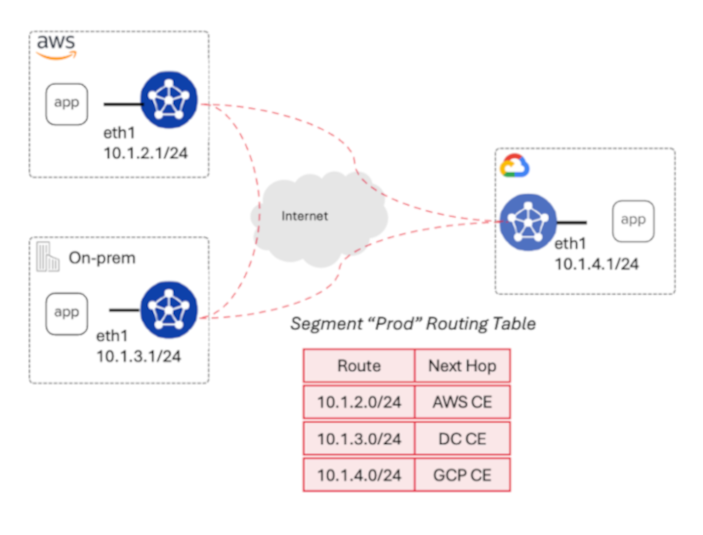
Figure: network segmentation diagram
In addition, network segmentation can be used for running multiple environments (production/development) that are completely isolated from one another and across different hybrid and multi-cloud locations. Network segmentation is also a key pillar for service networking and can also be used in conjunction with external connectors.
Border Gateway Protocol
F5 Distributed Cloud provides Border Gateway Protocol (BGP) support for CEs to allow seamless integration and interoperability with third-party networking and security gateways. BGP operates in two modes:
-
Directly over Ethernet: BGP runs on an Ethernet interface when the CE and the peer device are on the same subnet or reachable across a Layer 3 network. This can run on any of the CE’s interfaces or sub-interfaces. The interface can belong to any VRF (SLO, SLI, or network segment).
-
Over IPsec VPN: BGP can also be established on top of IPsec VPN tunnels, as part of the new External Connector functionality.
External Connectors
The CE's External Connector allows standard IPsec connectivity to third-party devices, such as routers and firewalls.
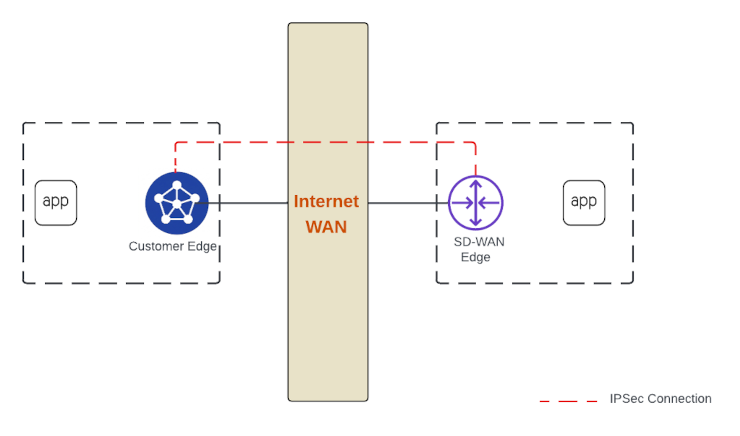
Figure: External Connectors diagram
An External Connector is useful when you need to interoperate with third-party networking and security devices (AWS TGW, Palo Alto firewalls, Cisco routers, SD-WAN providers). See the following:
- External Connectors can be part of a network segment or part of a local VRF, such as the SLO or SLI interfaces.
- External Connectors can be established over private or public connectivity.
- External Connectors can be the source of any interface within an SLI or SLO. This is the underlay interface of the External Connector.
Enhanced Firewall Policy
CEs provide built-in network firewall functionality. The firewall provides:
- An ability to create network-level policies based on VPC tags, VPC IDs, IP, and IP prefix set objects.
- An ability to tie to segments for granular control on where the policy is applied.
- An ability to use label selectors for selecting traffic coming from VPC-level tags.
- An ability to use logging, where each of the sessions details is logged along the action (allow/deny) applied, providing optimum granularity.
References
For more information, see:
- CE Datasheet
- Customer Edge Ecosystem Support
- Customer Edge Site Sizing Reference
- Create Secure Mesh Site v2
- Customer Edge Registration and Upgrade Reference
- Secure Mesh Site FAQs